 1641b4aba5
Follow-up to #9507, carrying over the reset-credit redemption from #9421. Codex grants a reset credit when it has rate-limited an account unfairly (`"Thanks for using Codex! You've been granted one free rate limit reset."`). Redeeming one clears the current 5h/weekly windows. The Limits tab now shows how many are banked and when the next expires, with a confirmed **Use a reset credit** action. ## How it works - `ServerProviderUsageLimits.resetCredits` carries the count and soonest expiry; the Codex probe reads it from the same `account/rateLimits/read` it already makes. - `ProviderInstance.consumeResetCredit` is a new optional hook — account-level, so it sits beside `refreshModels` rather than on the thread-routed adapter. The Codex driver implements it over a short-lived app-server (via `withCodexAppServerClient`, factored out of the status and skills probes which duplicated the setup), then re-probes. - Single-flight per instance with one idempotency key kept until Codex reports an outcome, so a retry after a timeout does not open a second attempt. - New `provider.consumeResetCredit` RPC under the operate scope; the outcome (`reset` / `nothingToReset` / `noCredit` / `alreadyRedeemed`) is shown inline. Only Codex reports credits today. A provider without the hook gets a clear "does not bank reset credits" error; one without credits shows nothing. ## Screenshots The local Codex row with one banked credit (the same account via the CLIProxyAPI hub above it shows no credit, as expected — the hub does not relay them): 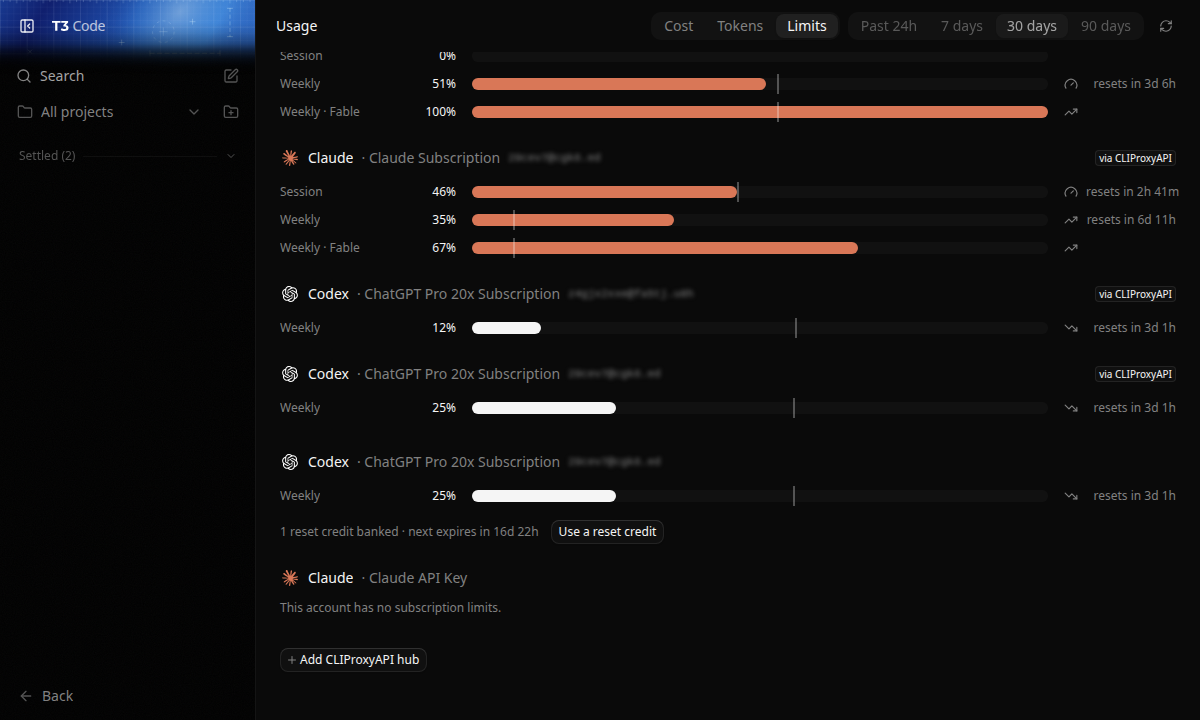 Close-up of the row:  Clicking it opens the confirmation; nothing is sent until **Use credit**: 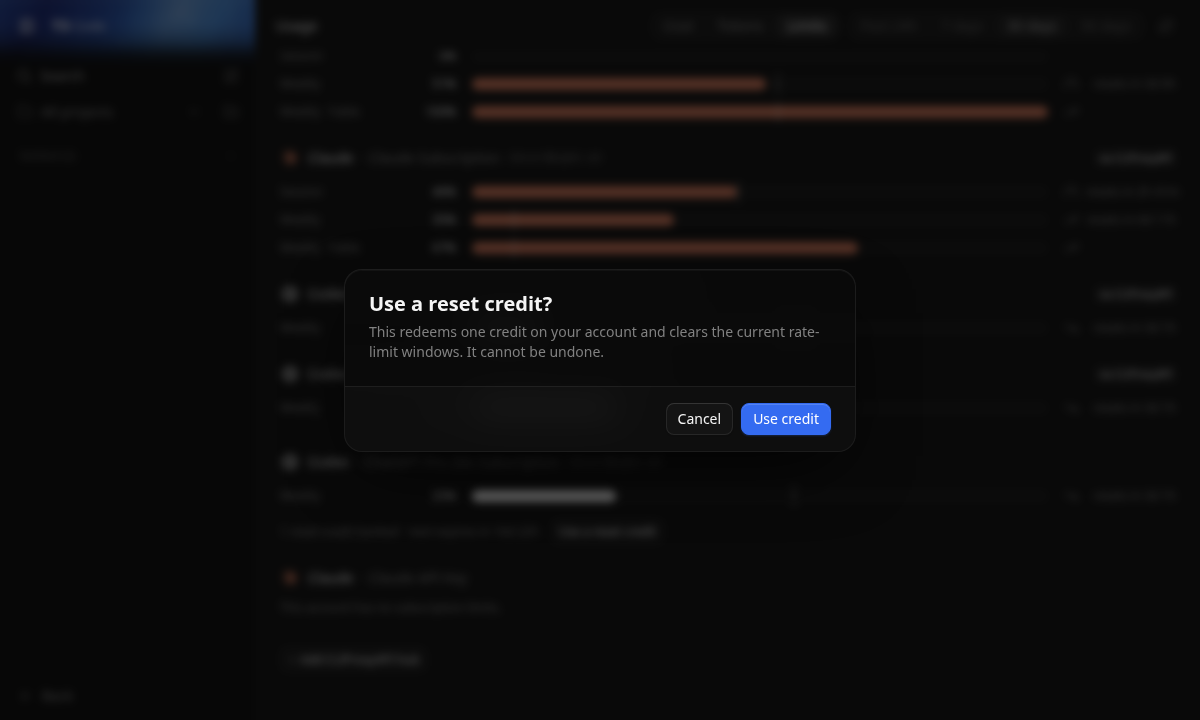 ## Verification - Mapper tests for the credit summary; provider, contract, and Usage page suites pass; typecheck clean. - Verified against a real Codex Pro account holding one credit: summary and expiry render, the confirm dialog opens. **Not redeemed** — that would spend the credit. Written by Claude Fable 5 via Claude Code; design and single-flight approach from @StiensWout's #9421. <!-- CURSOR_SUMMARY --> --- > [!NOTE] > **Medium Risk** > Redemption spends real account credits over a new RPC; correctness depends on per-account locking and idempotency, though disabled instances and non-Codex providers are rejected explicitly. > > **Overview** > Adds **end-to-end redemption of banked Codex rate-limit reset credits** from the Limits UI on web and mobile, backed by a new operate-scoped `provider.consumeResetCredit` RPC. > > **Contracts and server:** `ServerProviderUsageLimits` can include `resetCredits` (count + next expiry). Codex probes attach that from `account/rateLimits/read`. Optional `ProviderInstance.consumeResetCredit` is implemented for Codex via a scoped app-server call to `account/rateLimitResetCredit/consume`, then a limits refresh. `CodexResetCreditCoordinator` serializes redemptions per Codex account directory, reuses one idempotency key until Codex returns an outcome, and times out hung requests. `withCodexAppServerClient` is extracted so status, skills, and redemption share the same short-lived app-server setup. > > **Clients:** Limits rows show banked credits and a confirmed **Use a reset credit** action that calls `serverEnvironment.consumeResetCredit` and surfaces outcomes (`reset`, `nothingToReset`, etc.) or errors. > > **Web usage sources (same PR):** Adding/removing CLIProxyAPI hubs and the add dialog target a **selected connected environment** (with picker when several are connected), gated by operate access—not only the primary environment. > > <sup>Reviewed by [Cursor Bugbot](https://cursor.com/bugbot) for commit 98f32e60852dca1d38c94335b3ed7aac8c4b895e. Bugbot is set up for automated code reviews on this repo. Configure [here](https://www.cursor.com/dashboard/bugbot).</sup> <!-- /CURSOR_SUMMARY --> Co-authored-by: Wout Stiens <[email protected]> Co-authored-by: Claude Code <[email protected]>



T3 Code Mobile
Warning
T3 Code Mobile is currently in development and is not distributed yet. If you want to try it out, you can build it from source.
Quickstart
Note
Uses native modules so using Expo Go is not supported. You need to use the Expo Dev Client.
This app has three variants:
development: Expo dev client, installable side-by-side asT3 Code Devpreview: persistent internal preview build, installable side-by-side asT3 Code Previewproduction: store/release build asT3 Code
Run commands from apps/mobile.
T3 Connect is optional and disabled in a fresh clone. Public configuration belongs in the
repository-root .env or .env.local, not an apps/mobile/.env file. See
../../.env.example.
Development
Start Metro for the dev client:
vp run dev:client
Metro keeps its transform cache between ordinary starts. If the cache itself is causing stale or invalid output, clear it for one development-client start:
vp run dev:client:reset
Run that reset once after installing or changing the Uniwind dependency patch. Cached transforms can otherwise reference its previous pnpm package path. Ordinary Metro starts still keep the cache.
Component edits use Fast Refresh. Connection-runtime edits replace the active Effect layer through a stable atom runtime, preserving navigation and existing atom subscribers. Replaced registries and managed runtimes dispose their resources; the app does not force a JavaScript reload. The Uniwind patch skips global style invalidation when generated styles and themes are unchanged, while real style changes still refresh. See mobile development lifecycle for the lifetime boundaries.
Build and run the local iOS dev client:
vp run ios:dev
If your Xcode account only has a Personal Team, use a bundle identifier you control and opt into the reduced-capability local build. Personal Team builds omit the widget and share extensions, push entitlement, and native Sign in with Apple entitlement; builds without this opt-in are unchanged.
T3CODE_IOS_PERSONAL_TEAM=1 \
T3CODE_IOS_PERSONAL_TEAM_BUNDLE_ID=com.example.t3code.dev \
vp run ios:dev
Build and install a self-contained Release app that does not need Metro:
vp run ios:release
The Personal Team equivalent also needs a unique bundle identifier:
T3CODE_IOS_PERSONAL_TEAM=1 \
T3CODE_IOS_PERSONAL_TEAM_BUNDLE_ID=com.example.t3code \
vp run ios:release
Build and run the local iOS preview app:
vp run ios:preview
Force the review diff highlighter engine:
EXPO_PUBLIC_REVIEW_HIGHLIGHTER_ENGINE=javascript vp run ios:dev
javascript is the default and recommended setting for the review diff screen. Set EXPO_PUBLIC_REVIEW_HIGHLIGHTER_ENGINE=native only when you explicitly want to test the native Shiki engine.
Inspect the resolved Expo config for a variant:
vp run config:dev
vp run config:preview
Run static checks for mobile native code:
node ../../scripts/mobile-native-static-check.ts
The native lint task runs SwiftLint for Swift plus ktlint and detekt for Kotlin. Missing native tools are reported as warnings and skipped locally. CI installs the default toolset from apps/mobile/Brewfile before running the native checks.
EAS Builds
Preview and production variants use Expo fingerprinting so OTA updates only reach binaries with matching native dependencies, config plugins, and patches. CI uses the preview:dev profile to reuse a compatible native build when possible.
The development variant uses appVersion to avoid recalculating the native fingerprint for each Metro launch manifest. MOBILE_VERSION_POLICY can override either default. If you distribute a custom Release build with the development identity and publish OTA updates to it, set MOBILE_VERSION_POLICY=fingerprint for both its build and updates. Changing the runtime policy requires a native rebuild for OTA matching; an existing dev client can still load local Metro bundles.
For preview or production EAS environments, set T3CODE_CLERK_PUBLISHABLE_KEY,
T3CODE_CLERK_JWT_TEMPLATE, and T3CODE_RELAY_URL
as EAS environment variables. Expo config maps the canonical values into the mobile build.
Create a PR preview dev-client build manually:
vp run eas:ios:preview:dev
Create a cloud dev-client build:
vp run eas:ios:dev
Create a persistent preview build:
vp run eas:ios:preview
Android equivalents:
vp run eas:android:dev
vp run eas:android:preview:dev
vp run eas:android:preview